I've spent thousands of hours building, testing, designing, breaking, playing and freelancing in the Power Platform.
And if there is one thing all those hours taught me, it is this:
The right tool can save you hours.
Not in a vague "work smarter" way. I mean a measure that took an afternoon to debug, fixed in ten minutes once I had the right thing open. A flow I had given up on, solved by a connector I did not know existed. A Dataverse query that made no sense until a better tool showed me what was really happening underneath.
The Power Platform is huge now. Power BI, Power Apps, Power Automate, Power Pages, Dynamics 365, Copilot Studio, Dataverse, Fabric, AI tooling. Nobody keeps all of that in their head perfectly. The trick is not knowing everything. The trick is knowing what to reach for when the work starts fighting back.
So here is my 2026 version of the tools list I keep coming back to.
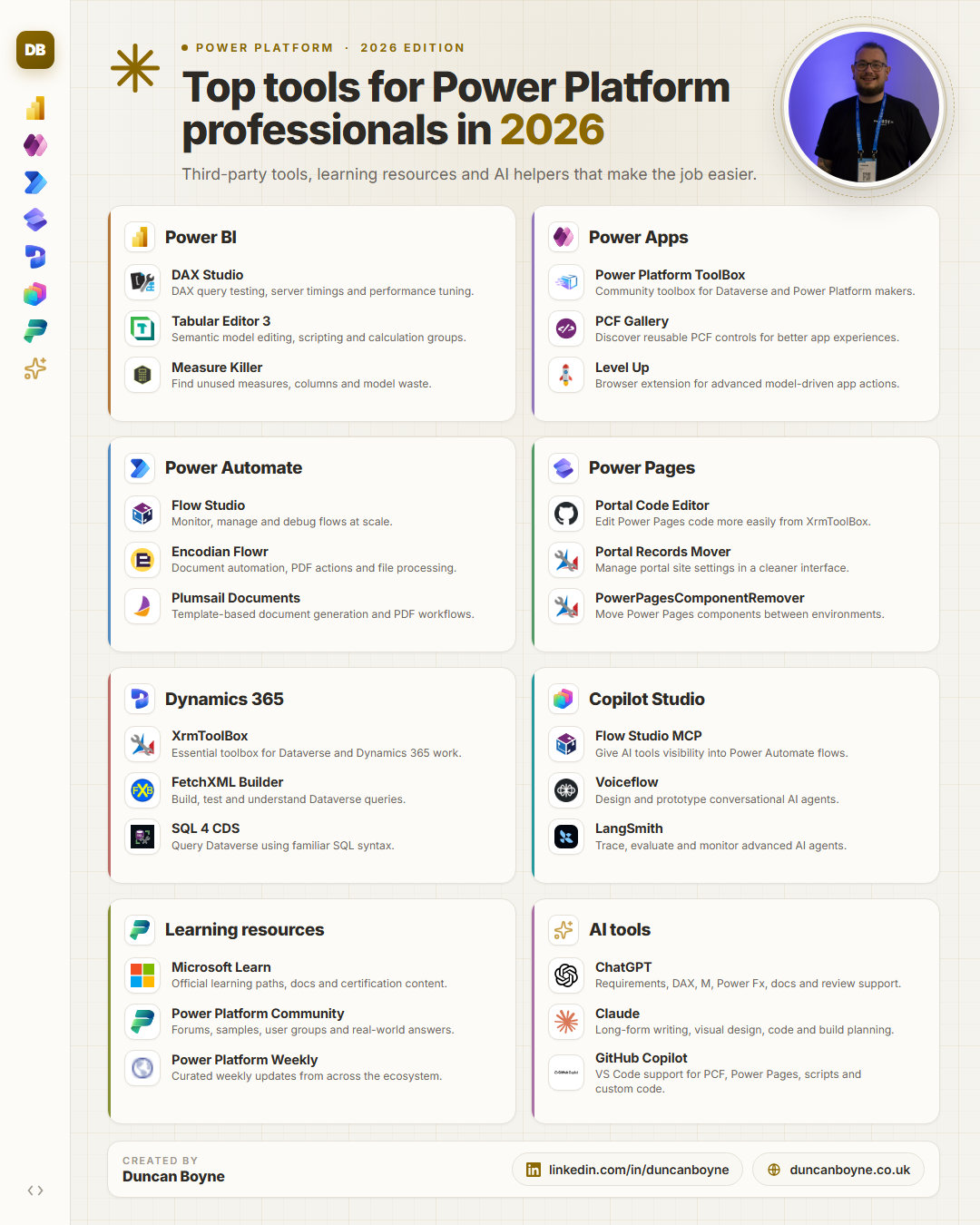
Power BI
DAX Studio
Still essential. If you work with DAX and performance, DAX Studio is one of those tools that quietly becomes part of your muscle memory. Query plans, server timings, exports, traces, testing measures properly. It is the difference between guessing why something is slow and actually seeing it.
Tabular Editor 3
For serious semantic model work, Tabular Editor 3 is hard to beat. Calculation groups, scripting, bulk edits, model inspection, cleaner development workflows. If Power BI Desktop is the workshop, Tabular Editor is the bench with all the sharp tools laid out.
Measure Killer
Models collect clutter. Measures get created, copied, abandoned and forgotten. Measure Killer helps you find the unused stuff, clean the model, and stop carrying dead weight into every refresh and handover.
Power Apps
Power Platform ToolBox
A community toolbox for makers and consultants who spend time inside Dataverse and Power Platform environments. Useful utilities, practical shortcuts, and the sort of tools that make admin jobs less painful.
PCF Gallery
If you are building model-driven apps or canvas apps and need richer components, PCF Gallery is a brilliant discovery point. It helps you see what is already out there before you decide to build something custom.
Level Up
Level Up is one of those browser extensions that feels tiny until you need it. It exposes advanced model-driven app and Dynamics actions that are otherwise buried, awkward or just slower to get to.
Power Automate
Flow Studio
For monitoring, managing and debugging flows at scale, Flow Studio earns its place. Power Automate can get messy fast once you have enough flows, environments and owners involved. Visibility matters.
Encodian Flowr
Document automation and file handling are where a lot of flows become surprisingly fiddly. Encodian Flowr gives you extra actions around PDFs, documents and file processing that can save a lot of custom work.
Plumsail Documents
Another strong option for template-based document generation. If your process ends with "create the document, send the PDF, store the file", tools like Plumsail can keep the flow cleaner.
Power Pages
Portal Code Editor
Power Pages work often needs you to move between low-code configuration and real code. Portal Code Editor makes that editing experience less clunky, especially when you are dealing with site settings, templates and web files.
Portal Records Mover
Useful when you need to move Power Pages configuration between environments without turning the process into a tiny migration saga.
PowerPagesComponentRemover
Power Pages components can be awkward to clean up when environments have been through a few iterations. This helps remove the things that otherwise linger.
Dynamics 365 and Dataverse
XrmToolBox
The classic for a reason. XrmToolBox is still one of the most useful pieces of the Dataverse and Dynamics ecosystem. So many good tools live inside it that it is less a single tool and more a working habit.
FetchXML Builder
FetchXML Builder is one of my favourites because it helps you understand what Dataverse is actually being asked to return. Build the query, test it, tweak it, learn from it.
SQL 4 CDS
Sometimes your brain wants SQL. SQL 4 CDS lets you query Dataverse in a familiar way, which is especially useful when you are trying to understand relationships, data shape and odd edge cases quickly.
Copilot Studio
Flow Studio MCP
This is where things start to get interesting. Giving AI tools visibility into Power Automate flows changes the conversation from "describe your automation" to "inspect this thing and help me understand it."
Voiceflow
Useful for designing and prototyping conversational experiences. Even if you do not ship through Voiceflow, it can help you think clearly about agent structure, user paths and handoffs.
LangSmith
Once agents get serious, tracing and evaluation matter. LangSmith is useful for understanding what happened, where the chain went wrong, and how to make the system more reliable.
Learning resources
Microsoft Learn
The official docs and learning paths are still the foundation. Not always glamorous, but when you need the supported answer, this is where you go.
Power Platform Community
Forums, samples, user groups, real people solving real problems. The community is still one of the biggest advantages of working in this ecosystem.
Power Platform Weekly
A useful way to keep up without trying to read every release note, blog post and announcement yourself.
AI tools
ChatGPT
Great for turning rough thinking into structure, explaining concepts, drafting requirements, reviewing DAX and M, and acting as a patient rubber duck when something refuses to make sense.
Claude
Claude is where I tend to go for longer-form thinking, writing, design prompts, code review and build planning. It is especially useful when you want help that preserves more of your voice.
GitHub Copilot
For anything involving code around the edges of the Power Platform, PCF, Power Pages, scripts, custom connectors, deployment helpers, Copilot in the editor is a real productivity boost.
The point is not the logo. It is the leverage.
Some of these tools are classics. Some are newer additions. All of them are worth knowing about.
But the real lesson is not "install everything on this list." Please do not turn your machine into a junk drawer with a taskbar.
The lesson is that the Power Platform job is too broad now to rely only on the default interface. The people who move quickly are not always the people who know the most. Often they are the people who know which tool will shorten the distance between the problem and the answer.
Save the list. Try one tool at a time. Add the ones that genuinely make your work easier.
And if there is a tool I should add to the list, I want to know about it.